Chrome extension ยท Local SEO

EchoPost

Turn an Instagram caption into a proper Google Business Profile post.

A caption that does well on Instagram is close to the opposite of a good Google Business Profile post. Hashtag stacks, "link in bio" and vibes over specifics all work against you in local search. Paste the caption, pick a tone, and EchoPost rewrites it for Google.

Right post type What's new, Offer or Event, picked from the caption.
Right length The message up front, where Google shows it.
Right button A call to action from Google's own set.

EchoPost icon
Hashtags and hype in
A clean Google post out.
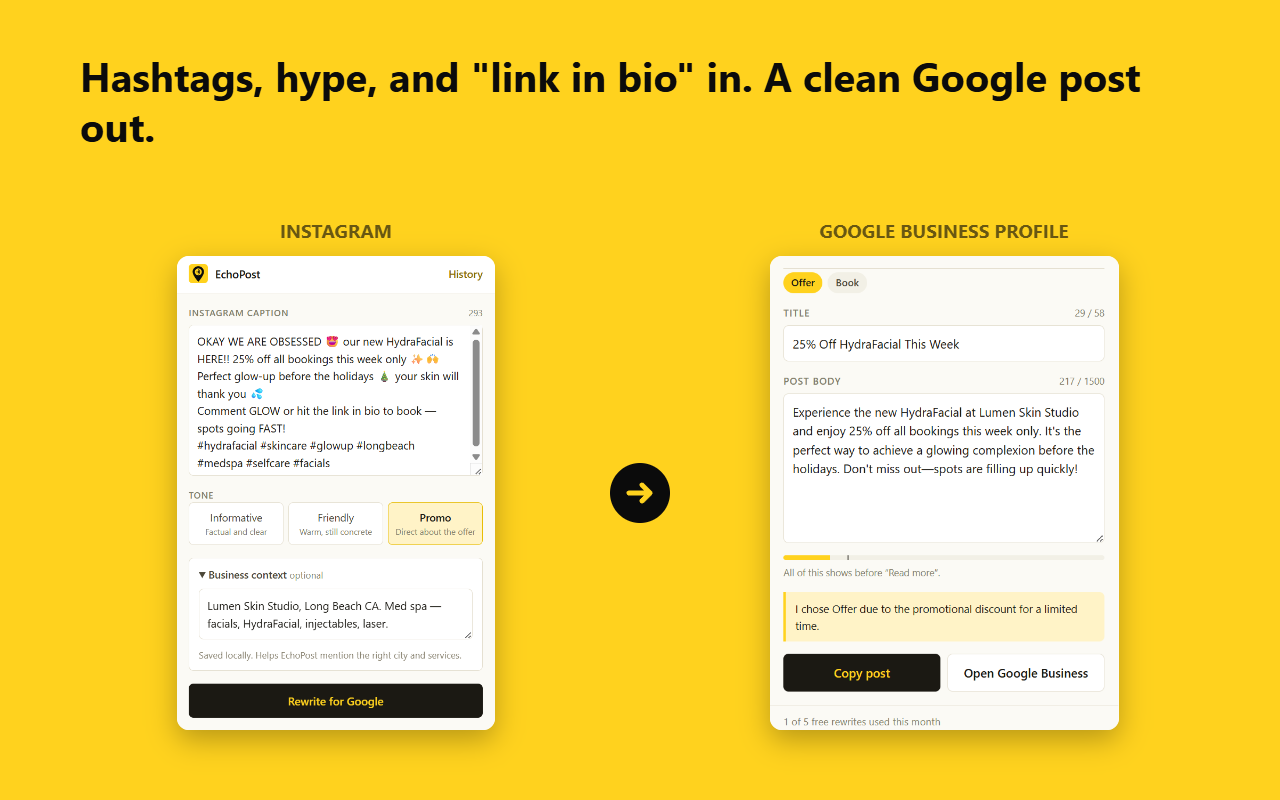
What works on Instagram works against you on Google.

Posting to your Google Business Profile regularly helps local search, but most businesses write for Instagram first. Pasting the same caption into Google carries every Instagram habit with it.

Hashtags do nothing

They don't function on Google Business Profile. EchoPost strips them.

"Link in bio" means nothing

There's no bio on Google. Instagram-only phrasing comes out, and the action moves to a real button.

Most of the post is hidden

Google shows roughly the first 150 to 300 characters before "Read more", so EchoPost front-loads what matters.

Numbers and links go in the button

Google doesn't want phone numbers or URLs in the body. EchoPost keeps them out and suggests the right call-to-action button instead.

Paste, rewrite, copy.

It takes under a minute, and no login to Instagram or Google.

EchoPost turning a hashtag-heavy med spa Instagram caption into a Google Business Profile Offer post with a title, body and Book button
  1. Paste your captionDrop an Instagram caption into the EchoPost popup. Add an optional note about your business so it can mention the right city and services.
  2. Pick a toneInformative, Friendly or Promo.
  3. Rewrite for GoogleGet a title, post body, post type and suggested button, plus a short note explaining its choices, like reminding you an Offer needs start and end dates.
  4. Copy and postCopy the result and paste it into your Google Business Profile. Your last 20 rewrites stay in the extension.

Free to start. Clear about your data.

Free plan: 5 rewrites a month

No account, no Instagram login and no Google login. Install it and start rewriting.

Where your caption goes

To write the post, your caption and optional business note are sent over HTTPS to the EchoPost rewrite service, which uses OpenAI. The service doesn't keep your caption. Your history stays in your browser, and a random install ID counts your free rewrites. Read the privacy policy.

Part of a small local SEO toolkit.

EchoPost keeps a Google Business Profile active. Two other DahVio extensions handle the rest of the local picture.

Local Schema Helper

Generate clean JSON-LD structured data for a local business website.

Citation Manager

Audit name, address and phone consistency across directories.

A few quick answers.

Do I need an account?

No. There's no EchoPost account, and no Instagram or Google login. Install it, paste a caption and rewrite.

Does it post to Google for me?

Not yet. You copy the finished post and paste it into your Google Business Profile. The Open Google Business button takes you straight there.

Does it read my Instagram?

No. You paste the caption yourself. EchoPost doesn't read the pages you visit.

Questions or bugs?

Email hello@dahvio.com. The caption you tried and what you expected is enough to go on.